








































Published 02 October 2026
Last Updated 05 October 2026

Construction Site ID: Meeting CSCS Requirements
There are now 2.3 million cards
carrying the CSCS logo in circulation across UK construction, and the way
sites check them has changed completely.
In January 2026, CSCS Smart
Check recorded
its 60 millionth scan, and in the first half of 2026 alone the platform has
handled 16.8
million scans, averaging almost 93,000 a day. The message from the industry
is clear: a quick glance at a card at the gate is no longer good enough.
Construction recorded the highest number of
worker deaths of any industry in Great Britain in 2025/26, with 25
fatalities, and falls from height remained the most common cause of fatal
injury across all sectors. Making sure everyone on site is who they say they
are, and is trained for the work they're doing, is one of the most basic
controls a principal contractor has.
This guide explains what CSCS
requires, what's changed in 2026, and why a CSCS card and a site pass do two
different jobs. We've supplied ID cards, access control and visitor management
to UK organisations since 1998, including contractors and facilities teams
running live sites. We don't issue CSCS cards, and we'll be clear throughout
about where our products help and where CSCS's own tools are the right answer.
What is CSCS?
CSCS is the leading verification scheme for the construction
industry. It’s a smart card system that proves that workers have the correct
qualifications and knowledge for their specific role in construction.
What CSCS requires (and what it doesn't)
CSCS is not a legal requirement
It surprises many people, but holding
a CSCS card is not a legislative requirement. It's up to the principal
contractor or client whether workers need a card to get on site. In practice,
though, most principal contractors and major housebuilders do require one,
which makes CSCS the standard across UK construction.
CSCS is owned by industry bodies
including Build UK, the Civil Engineering Contractors Association and the
Federation of Master Builders, alongside the Unite and GMB unions. Cards
carrying the CSCS logo are issued by the CSCS Alliance, a group of card schemes
that meet the Construction Leadership Council's recommendations on industry
card schemes. That's why you'll see Alliance cards from schemes such as CISRS,
ECS and EUSR on site alongside CSCS's own cards.
Where the legal duties come from
While the card itself isn't a
legal requirement, site security is. Under Regulation 13
of the Construction (Design and Management) Regulations 2015, the principal
contractor must take reasonable steps to prevent unauthorised people accessing
the construction site. On top of that, the Building Safety Act expects everyone
in a construction role to be able to demonstrate their competence, and CSCS
positions Smart Check as a key tool for evidencing that.
In other words, CSCS
verification answers the competence question, whilst your site ID and access
control process answers the unauthorised access question.
Not everyone on site will have a CSCS card
CSCS doesn't issue cards for
non-construction occupations, so some people will legitimately arrive on site
without one. Think delivery drivers, surveyors on a one-off visit, clients or
inspectors. Your process needs a clear route for these people, rather than
turning them away or waving them through.
What's changed for CSCS in 2026
Digital verification is now the expected standard
CSCS is unambiguous that visual
checks can't detect fake, fraudulently obtained, or revoked cards. Smart Check
verifies cards against the live database, confirming a card is genuine, in date, and that the holder has the right training for their role. It works in three
ways: a free app, the Smart Check
website, and an API that approved IT partners can build into site access
and induction systems. Major contractors including Wates, Vinci and Balfour
Beatty, and housebuilders such as Persimmon Homes and Taylor Wimpey, already
use the API.
Smart Check reads both physical
cards, using NFC or the QR code, and virtual cards held in the My CSCS app. The
app and website need an internet connection to verify in real time, which is
worth planning for on remote sites with poor signal.
SHEA and EUSR cards separate from 1 October 2026
From 1 October 2026, passing
a SHEA course will no longer automatically come with an EUSR CSCS Green
Labourer card. Utilities workers will need the correct EUSR CSCS card for
the role they carry out on a construction site, such as the new Utilities
Labourer card. Existing cards issued before the change keep the CSCS logo until
they expire, but gate staff should expect to see new EUSR card types and SHEA
cards without the CSCS logo from this autumn.
Industry Placement card changes
In July 2026, CSCS confirmed
that the Industry
Placement card now needs a minimum work placement of three weeks rather
than 30 days, with validity cut to two years. If you host students or new
entrants on placement, check expiry dates carefully, as these cards will turn
over faster than before.
Industry Accreditation cards can no longer be renewed
Cards issued under the old
Industry Accreditation route, often called grandfather rights, can no longer be
renewed or reissued. Anyone still holding one needs to move onto a
qualification-based card. A Smart Check scan will show you straight away if a
card has expired.
Why a CSCS card isn't a site pass
Two cards answering two different questions
A CSCS card tells you whether
someone is qualified and trained for their occupation. It doesn't tell you
whether they've been inducted on your site, which areas they're allowed into,
which contractor they're working for this week, or whether they should still be
there next month. That's all the job of a site pass.
Keeping the two separate also
protects your process. A CSCS card belongs to the worker and stays with them
from site to site. A site pass belongs to you, can be revoked the moment
someone leaves the project, and can be tied directly into your turnstiles and
door readers.
What a good construction site pass should show
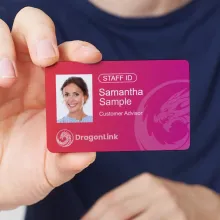
A site pass should make it quick for anyone on site to spot who belongs where. Most principal contractors include:
·
A clear, recent photo and the worker's name
·
Their employer or subcontractor, and their role
·
The date of their site induction and a pass
expiry date
·
Colour coding by role or permitted zone, for
example operatives, supervisors, visitors and plant operators
·
A site contact number on the back, so a lost
pass can be returned
Avoid printing unnecessary
personal data. A CSCS registration number can be useful for audit purposes, but
home addresses, dates of birth and medical details don't belong on a card
that's worn in public view.
Building a site ID process around CSCS
Step 1: Verify every card with Smart Check before induction
Make Smart Check part of
pre-induction, not something done occasionally. If a card fails verification,
don't admit the worker, and use the CSCS process for reporting a suspected
fraudulent card. Checking again at pass renewal catches cards that have expired
or been revoked since the first check.
Step 2: Record the check against the worker
Photocopying CSCS cards into a
folder proves very little, because a copy can't show whether the card is still
valid. A contractor
management system keeps induction records, documents and verification in
one place, so you can show an auditor or client exactly who was checked, when
and by whom.
Step 3: Issue a site pass once induction is complete
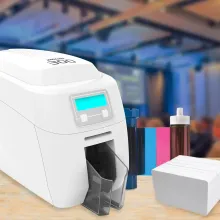
Print passes on site so new
starters aren't waiting days for a card. For shorter projects, printer rentals avoid
the capital cost of buying a printer you'll only need for one job. If passes
include a contactless chip for access control, a retransfer
printer gives the most reliable print quality over the chip. If you'd
rather outsource production, our ID
card printing service can supply finished passes to your design.
Step 4: Link the pass to your access control
A printed pass on its own relies
on someone checking it. Linking it to card readers
at turnstiles, gates and welfare cabins means access is enforced automatically
and logged. Access control cards using secure technology such as MIFARE
DESFire are much harder to clone than older proximity cards. Key fobs
and mobile
credentials are useful alternatives for workers who find cards easy to lose
or damage.
Step 5: Give visitors and non-construction workers their own route
Visitors, delivery drivers and
professional consultants shouldn't be handled the same way as inducted
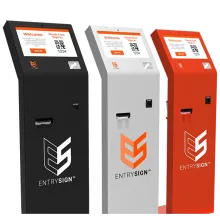
operatives. Visitor
management software such as EntrySign captures
who's arrived, who they're visiting and when they left, and prints a clearly
different visitor badge. That real-time record is also invaluable for a roll
call if the site needs to be evacuated.
Step 6: Manage expiry, leavers and lost passes
Set each pass to expire at the
end of the project or the worker's contract, whichever comes first. When
someone leaves, deactivate their access the same day. Lost passes should be
cancelled immediately and replaced, rather than left active in the system.
Choosing ID products that survive site conditions
Holders, lanyards and reels
Dust, rain, gloves and hi-vis
layers are hard on ID. Enclosed
cardholders protect passes from damage and weather, and armband holders
from our cardholder
range keep ID visible over outer layers. Where lanyards are used, choose
breakaway styles so they release if caught on machinery or scaffolding. Badge
reels are a practical option for workers who need to present a card at
readers throughout the day, and personalised
lanyards in role colours make it easy to spot who's who from a distance.
Card technology
For a single short project, a
printed photo pass and a visitor system may be all you need. For multi-year
projects or organisations running several sites, a consistent smart card
standard means one credential can work across every site's access control, and
passes can be reissued rather than replaced when workers move between projects.
What should we do if a CSCS card fails a Smart Check?
Don't allow the worker onto site
on the strength of that card. Check the details with the individual in case of
a simple error, and if you suspect the card is fake or fraudulently obtained,
report it through CSCS's fraud reporting process.
Do we still need to photocopy CSCS cards?
Photocopies can't show whether a
card is genuine or still valid, which is why CSCS recommends digital
verification instead. Keeping a digital record of each Smart Check alongside
the worker's induction record is more useful, and it avoids storing unnecessary
copies of personal data.
Getting construction site ID right
Meeting CSCS requirements in
2026 comes down to three things: verify every card digitally with Smart Check,
issue your own site pass once someone has been inducted, and make sure that
pass controls where they can go and for how long. Get those right, and you'll
have a process that stands up to client audits, supports your CDM duties and
keeps unqualified or unauthorised people off site.
If you're setting up ID for a new project, or tightening up the process across several sites, get in touch. We'll give you honest advice on what your site actually needs, whether that's a simple pass and visitor system or fully integrated access control.
About the Author

Ben O'Brien
Managing Director
Ben O’Brien is the Managing Director of ID Card Centre and a recognised authority in complex access control applications and eco-friendly identification solutions. Since entering the ID card printing industry in 1998, Ben has led countless projects across sectors, combining deep technical knowledge with a commitment to sustainability and innovation. Under his leadership, ID Card Centre continues to set standards for secure, efficient, and environmentally conscious ID systems.