














































Published 11 September 2026
Last Updated 04 September 2026

Exam season puts a university's ID card system under more pressure than almost any other point in the academic year. Thousands of candidates need to be identifiable, and quickly, by invigilators who may never have met them before and the consequences of getting it wrong range from a delayed exam start to a live case of impersonation or malpractice.
Most universities don't issue a separate "exam card". The same student ID card used for library access, catering, and building entry is also the card placed face-up on the desk during an exam. That dual purpose is exactly why it needs careful thought. A card designed only with everyday campus use in mind can fall short the moment it has to do the one job that matters most: proving, immediately, that the person sitting the exam is who they say they are.
The photo must be high quality
For day-to-day access control, a slightly outdated or low-resolution photo rarely causes problems. In an exam hall, it's a different story. Invigilators are trained to check the candidate against the photo on the card, often while walking a row of desks rather than standing over one student, so the image needs to be:
The photo should be current
Ideally re-captured periodically, not carried over from initial enrolment three or four years earlier.
High resolution and well-lit
Printed at a size and quality that holds up under exam-hall lighting, not just on a screen.
Front-facing and unobstructed
Consistent photo standards at the point of capture avoid disputes later.
If your card printer or bureau service supports photo ID capture as part of enrolment, this is worth reviewing annually rather than assuming photos taken in a student's first term will still be usable in their final year.
Include the candidate's name and number
Exam attendance registers are typically organised by candidate or student number, not by name alone, so the number needs to be immediately visible on the card, printed clearly enough to be read at a distance and cross-checked against a seating plan or register without the invigilator needing to pick the card up.
Where a course or module code also needs to be checked (for example, in shared exam halls running multiple papers simultaneously), consider whether that information belongs on the card itself or is better handled through the seating plan. Printing it on the card only helps if it's guaranteed to be current, and course enrolment can change after cards are issued.
Full legal name
The name printed on the card must match the name a candidate is registered under for the exam, not a preferred or shortened version, unless the university's systems consistently record and check against that same name.
Mismatches between the name on a card and the name on an attendance register are one of the most common causes of delay and dispute at the start of an exam, and they're avoidable with consistent data between the student record system and the card printing process.
Durability across multiple exam sittings
A card issued at enrolment may need to survive daily use for three, four, or more years, and be presented at every exam. Cards that fade, delaminate, or wear out mid-course create a risk at exam time that needs to be resolved as quickly as possible.
Specifying durable PVC card stock, a laminate overlay for high-use cards, and a printer capable of consistent print quality over the volumes a university needs all reduce how often this becomes an issue. If you print in-house, this is also where checking your printer and ribbon combination against expected card lifespan pays off.
A contingency plan for lost or damaged cards
Every exam office has already dealt with a candidate who has lost, forgotten, or damaged their card on the morning of a paper. What matters is having a fast, consistent process, not scrambling case by case. Common approaches include:
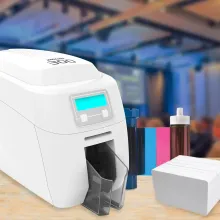
- A same-day replacement or temporary card printed by the exams office or registry, using an on-site printer
- A documented alternative ID policy (passport, driving licence) that invigilators are trained to follow consistently
- A photo-and-signature log for candidates without any accepted ID, as a fallback of last resort
Having the equipment to print a temporary card on the spot rather than only being able to reissue via a bureau turnaround of several days is one of the most practical investments an exams office can make ahead of peak exam periods.
Keeping up with exam card demand
Enrolment, resits, and start-of-term periods can mean printing hundreds or thousands of cards in a short window, often with a hard deadline before the first exam paper. Two things matter here:
- Throughput: a printer rated for the batch sizes you actually need, not just steady-state daily issuance
- Consistency at volume: colour, alignment, and encoding quality shouldn't drift over a long print run
Universities running large cohorts often use a mix of an in-house ID card printer for day-to-day and urgent reissues, alongside a bureau printing service for the bulk of annual enrolment, printing thousands of cards to a consistent standard and having them dispatched ready for distribution week.
Encoding for exam hall entry and attendance tracking
Where a university uses barcode or smart card scanning to log attendance as candidates enter an exam hall, the encoding on the card needs to be reliable at volume and speed, as large exam halls with hundreds of candidates arriving in a short window put more strain on scanning systems than routine building access does. This is worth testing specifically for exam-hall conditions, not just assumed from general campus performance.
Data protection and what not to print
It can be tempting to add more information to a card to make invigilators' jobs easier, but exam ID cards are handled and seen by more people, in more settings, than most other university ID. Under UK GDPR, that means being deliberate about what actually needs to be visible:
- Avoid printing information about reasonable adjustments or access arrangements directly on the card. This is sensitive data, and candidates are entitled to have it handled discreetly through the seating plan and invigilator briefing, not visible on a card carried in public.
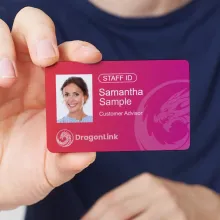
- Stick to what invigilators genuinely need to verify identity: name, photo, candidate number, and course/level where relevant.
- If a QR code or barcode links to a student record, make sure access to that record is properly controlled, the code itself shouldn't expose personal data to anyone who scans it.
The difference between a Student ID card vs a dedicated exam card
Most UK universities use one card for both purposes, but it's worth understanding the trade-offs:
| Standard Student ID (dual purpose) | Dedicated Exam Candidate Card | |
|---|---|---|
| Cost | One card to design, print and issue | Additional print run per exam period |
| Convenience | Familiar to students; always carried | Extra card to distribute and track |
| Design focus | Balances everyday access with exam legibility | Can be optimised purely for invigilation |
| Best suited to | Most university settings | Private candidates, short courses, or providers without a standing card system |
For most universities, getting the standard student card right for exam use rather than running a second card scheme is the more practical and cost-effective route.
Do universities have to follow JCQ rules for exam ID?
JCQ (Joint Council for Qualifications) regulations govern GCSE, A-level, and related qualifications, and apply to schools, colleges, and other centres offering those qualifications, including some further education settings. Universities generally set their own exam conduct and ID verification rules for their own degree-level assessments, though the underlying principle that a candidate's identity must be verifiable against a register is consistent across both.
What happens if a student doesn't have their ID card at an exam?
Most universities allow an alternative form of photo ID (passport or driving licence) and require the exams office or invigilator to log the incident. Policies vary, so it's worth having a clearly documented fallback process that invigilators are briefed on before every exam period.
How often should student ID photos be updated for exam purposes?
There's no fixed rule, but many universities find that photos more than two to three years old start to cause genuine identification difficulty for invigilators, particularly for longer courses. Building a photo refresh into re-registration at the start of each academic year is a practical middle ground.
Can the same printer handle both everyday student cards and exam-period bulk printing?
Many printers can, but it depends on the rated duty cycle and print volume you need during peak periods. If your everyday issuance is low but enrolment periods demand printing in the thousands, it's worth checking your printer's specification against exam-period volumes specifically, not just average use.
Getting exam card printing right
Education ID cards don't need to be complicated, but they do need to be reliable, at volume, under time pressure and every single exam period. That means the right card stock, a printer (or bureau partner) rated for the volumes your enrolment periods demand, and a clear process for the fallback cases that will inevitably come up.
If you're reviewing your exam card process ahead of the next academic year, get in touch with our team to talk through what your printers, cards, and enrolment volumes need to look like.
About the Author

Ben O'Brien
Managing Director
Ben O’Brien is the Managing Director of ID Card Centre and a recognised authority in complex access control applications and eco-friendly identification solutions. Since entering the ID card printing industry in 1998, Ben has led countless projects across sectors, combining deep technical knowledge with a commitment to sustainability and innovation. Under his leadership, ID Card Centre continues to set standards for secure, efficient, and environmentally conscious ID systems.