









































There are no products to list in this category.
CardExchange Producer
CardExchange Producer | ID Card Design and Production Software
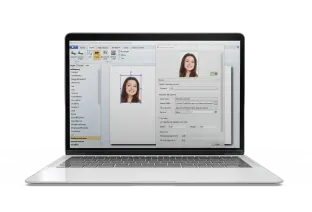
Professional desktop ID card design software to help create and print cards.
ID Card Centre supplies all five Producer editions, from the entry-level Go edition for small teams through to Enterprise for large organisations with advanced encoding and directory integration requirements. Each edition is a one-off licence purchase, runs on Windows, and works directly with your existing ID card printers, giving you full local control over your card production without the need for ongoing subscription fees.

CardExchange® Producer Editions
CardExchange Producer is available in five editions. Each one builds on the last, adding database connectivity, encoding capability, security features and network licensing as your requirements grow. Here is what each edition offers.

CardExchange® Producer Go Edition
Entry-level ID card design and printing for small teams
The CardExchange® Producer Go edition is the most accessible starting point for organisations that need to design and print cards without complexity or significant upfront cost. It includes the step-by-step card design wizard, support for 1D barcodes, magnetic stripe encoding, DirectShow, Twain and Canon camera support, and an internal database with capacity for up to 200 records. Card templates are limited to five, and the software supports standard CR-80 card sizes only. CardExchange Go is a practical, easy-to-use solution for small businesses, clubs and community organisations that need professional ID cards without advanced functionality.

CardExchange® Producer Premium Edition
External database connectivity and expanded design tools
The CardExchange Producer Premium edition steps up from Go with unlimited card templates, support for all card sizes, and connectivity to external databases including MS Access, MS Excel, CSV files and Paradox. It adds image background removal, 2D barcodes, export card preview, signature capture, advanced photo options and batch printing, making it a significantly more capable tool for organisations that need to manage larger cardholder datasets and produce more varied card designs. Premium also introduces user login functionality, allowing up to five users with individual profiles and customisable access permissions.

CardExchange® Producer Professional Edition
Advanced database management and native SQL connectivity
Professional adds native database connections to MS SQL Server, Oracle, MySQL, DB2, PostgreSQL and ODBC sources, making it the right choice for organisations that need to connect Producer directly to an existing enterprise database or HR system. It also introduces unlimited layouts per template, automatic face recognition and face crop, an autoprint server for automated card issuance, advanced primary key and insert/update options, the ability to create internal database views and queries, and full user group management with unlimited users and groups. Professional is well suited to medium and large organisations that need robust data management alongside their card production workflow.

CardExchange® Producer Business Edition
Network licensing and smart card encoding
The Business edition introduces network licensing, allowing the software to be installed across multiple computers connected to a single licence manager folder, making it the first edition in the series suited to teams where more than one person needs access to the same card templates and cardholder data simultaneously. It also adds HID Proximity encoding, MIFARE Classic 1K and 4K card encoding, a MIFARE setup wizard, Python scripting for workflow customisation, network printing support and batch print dispatcher functionality. Business is the right choice for organisations that need to issue access control credentials alongside photo ID cards and want the flexibility of a shared network setup.

CardExchange® Producer Enterprise Edition
The complete Producer solution with advanced encoding and directory integration
Enterprise is the most fully featured edition of CardExchange® Producer, adding capabilities that go beyond what any other desktop ID card management software typically offers at this level. On top of everything included in Business, Enterprise adds MIFARE DESFire EV1, EV2 and EV3 encoding across all memory formats, MIFARE SAM AV2 support, Active Directory read and write via LDAP, external plugin support, ID scanner integration, and fingerprint scanner support. It is the only edition with full biometric enrolment and verification capability, and the only one that supports the Paxton access control plugin, contact card encoding, MIFARE UltraLight and iClass reading. For organisations that need to create professional ID cards that also function as fully encoded access control credentials tied to a live directory, Enterprise is the complete solution.
Which CardExchange® Producer Edition is Right for My Organisation?
Choosing between the five Producer editions comes down to three things: how many cardholder records you need to manage, what database systems you need to connect to, and whether your cards need to function as access control credentials. The table below maps common organisational scenarios to the edition most likely to fit.
| The Situation | Recommended Edition |
|---|---|
| Small business or club, basic photo ID cards, no external database needed | Go |
| Small to medium organisation, external database or spreadsheet, signature capture needed | Premium |
| Medium to large organisation, enterprise database (SQL, Oracle, MySQL), multiple user groups | Professional |
| Multi-user team, shared network setup, HID or MIFARE Classic access control encoding | Business |
| Large organisation, DESFire or SAM AV2 encoding, Active Directory integration, biometric or ID scanner support | Enterprise |
System Requirements
CardExchange® Producer runs on Windows and has modest hardware requirements, making it compatible with most modern office computers. The minimum specification is a 1 GHz processor with 1024 MB RAM, though 2048 MB RAM is recommended for smoother performance, particularly when managing larger databases or running batch printing jobs. A compatible ID card printer and an active internet connection are required for licence activation. Full system requirements and a list of supported devices are available on the CardExchange website.
Ready to Find the Right Edition?
Our team can help you identify the right CardExchange Producer edition for your organisation, whether you know exactly what you need or are starting from scratch. All five editions are available to buy online now, with expert UK-based support available if you have questions before or after purchasing.
Frequently Asked Questions
What is CardExchange® Producer?
CardExchange® Producer is desktop ID card design and production software for Windows. It allows organisations to design and print cards, manage cardholder records in a database, and encode credentials for use with access control systems. It is available in five editions: Go, Premium, Professional, Business and Enterprise each offering progressively more advanced functionality depending on the needs of your business.
How do I download CardExchange Producer?
After purchasing a licence from ID Card Centre, you will receive a serial number and activation code by email. You can then download the software directly from the CardExchange website and activate it using those credentials.
*Please note that licences are not dispatched instantly and require order processing before the activation details are sent. However, we aim to dispatch licences in 1-2 working days.
Can I upgrade from one edition to another?
Yes. CardExchange offers upgrade licences, so if your requirements grow and you need to move from Go to Premium, or from Professional to Business, you do not need to start your card templates or database setup from scratch. Looking to upgrade? Get in touch with our team, and we talk you through the process.
Does CardExchange Producer work on Mac?
CardExchange® Producer is designed for Windows operating systems and is not natively compatible with Mac. Organisations that need cross-platform or browser-based access should consider CardExchange Cloud Suite instead.
What is the difference between Business and Enterprise editions?
Both editions include network licensing and MIFARE Classic encoding. Enterprise adds MIFARE DESFire EV1, EV2 and EV3, MIFARE SAM AV2, Active Directory integration via LDAP, ID scanner and fingerprint scanner support, and external plugin compatibility. Enterprise is the right choice where cards need to carry high-security encoded credentials or integrate with a live user directory.
Is CardExchange Producer suitable for id card production at scale?
Yes. The Professional, Business and Enterprise editions all support batch printing, autoprint server functionality and network printing, making them capable of handling high-volume id card production across large organisations. Business and Enterprise also support multiple database connections, so cardholder data can be pulled and pushed across several systems simultaneously.
What ID card printers are compatible with CardExchange Producer?
CardExchange Producer is compatible with a wide range of id card printers from manufacturers including Zebra, Evolis, Magicard and HID Fargo. If you are unsure whether your existing printer is supported, our team can confirm compatibility before you purchase.